ES6 and Arrow Functions – Node.js Basics Part 3

So, the ES6 feature of arrow functions is not unique to Node.js, but they will be helpful to know as a more concise alternative to a regular function if you’re not already family with them. Both standard and shorthand arrow functions exist.

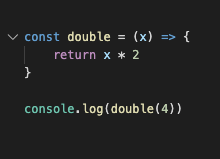
An ES5 function is compared with a standard ES6 arrow function below:

Both will produce a result of 8 with console.log(double(4))

Another feature of the arrow function is its shorthand syntax. Simple functions that take in an argument and immediately produce a result like the one above can use this shorthand form in order to be cleaner and more concise.
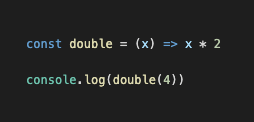
In this case, the curly braces and the return keyword are not necessary.

This shorthand syntax is used for simple rather than complex functions. For example, an if-statement would require the longer form of the arrow function.

Arrow functions are not a good choice when its comes to methods. That is, when they are used as properties on an object when we want to access “this”. For example “this.name” in the below examples. Arrow functions do not bind their own “this” value.

ES5 format:
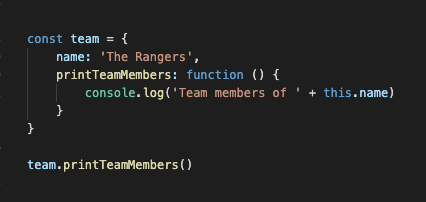
team.printTeamMembers()

We can, however, use an ES6 shorthand method syntax in this case: 
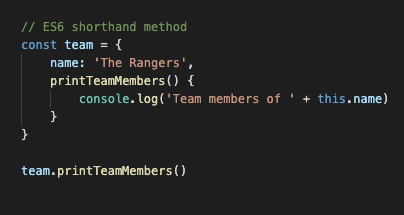
Hope that’s helpful! Happy coding 🙂

What is npm?

npm (Node Package Manager) is on online repository used by Node.js developers. It contains multitudes of libraries of pre-packaged code that are used by millions of people across various applications.  Much of it is free and open-source.

Usually you will use an npm package for something that is not unique to your app, meaning – there’s no need to reinvent the wheel. These could include things like email validation, a UI library like React or a debugging tool. 

You can install both local and global dependencies:

Local packages are installed directly on your app in the node modules directory and are listed in the package.json file. They can be installed on your project with a simple npm install command. In order to make use of a local package in a particular code file, you will need to include require(‘package-name’).

When you install a package globally you don’t install it directly into your source files, but rather in a single place on your system so that it can be re-used across various applications. This can be done with an npm install -g command. Globally installed packages give access to a new command in the terminal and should really only be used for packages that you intend to utilize across a number of projects. For instance, the nodemon package will allow you to automatically restart your app whenever the code is updated. This is potentially helpful across a whole range of apps.

Do you have any favorite npm packages?