What is TFIDF?

Since a computer cannot analyze text in its raw form, it must be converted into a numerical format – vectorization. One way to vectorize text data is TFIDF.

When dealing with textual data, it’s important to know which words are most important in a given document. For instance, if you’re trying to retrieve textual data on a particular topic, certain unique words may be more informative than generic words that occur very frequently.

While a straightforward count vectorizor will provide insight into how frequently a term occurs in a given document, a TFIDF (Term Frequency Inverse Document Frequency) approach will tell you whether or not to prioritize a word in a given document. 

TFIDF is equal to: term frequency * inverse document frequency.

In simple terms:

Term frequency (TF) refers to how often a term occurs in a given document divided by the total number if words in that particular document. 

Inverse document frequency (IDF) tells us which terms or words occur frequently across all documents and which ones occur rarely. Terms that are very common have a lower IDF and vice versa.

Our TFIDF score gives the words in a given document a weightage which provides an insight into which words in the text are most and least informative.

The most informative are those with a higher score in a given document and those with a lower score are less informative (commonly used words). It assigns a score rather than a frequency.

Doc 1: “I think that the purple sweater is the best choice for the event”

Doc 2: “She thought that the pink jeans were the best for the event.“

Doc 3: “I think the the best choice for the event is the red dress” 

The word the occurs a lot and has a high frequency count.

But words like purple, sweater and jeans provide more information on the person’s personal clothing choice. That’s the magic of TFIDF.

Do you have any favorite resources on this topic?

What are Intents and Slots in Alexa Skill Building?

Intents and slots are central to the Alexa skill building process, but what are they exactly?

𝐈𝐧𝐭𝐞𝐧𝐭𝐬

Intents consist of names and a list of “utterances”. The latter are the various ways in which a user might ask Alexa a question.
For example,
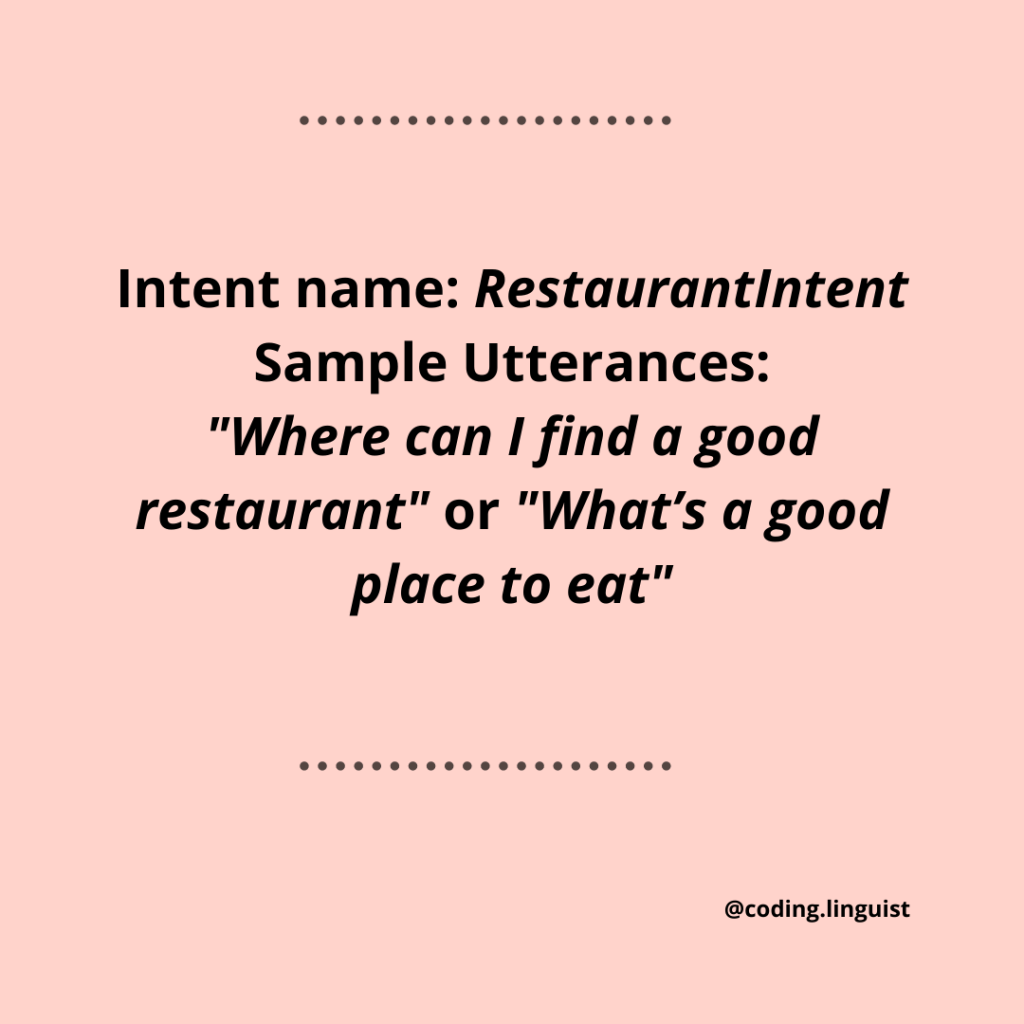
Name: “RestaurantIntent” Utterances: “Where can I find a good restaurant” or “What’s a good place to eat”.
Machine learning processes will cater for many more ways in which customers might ask this based on the utterances you add.
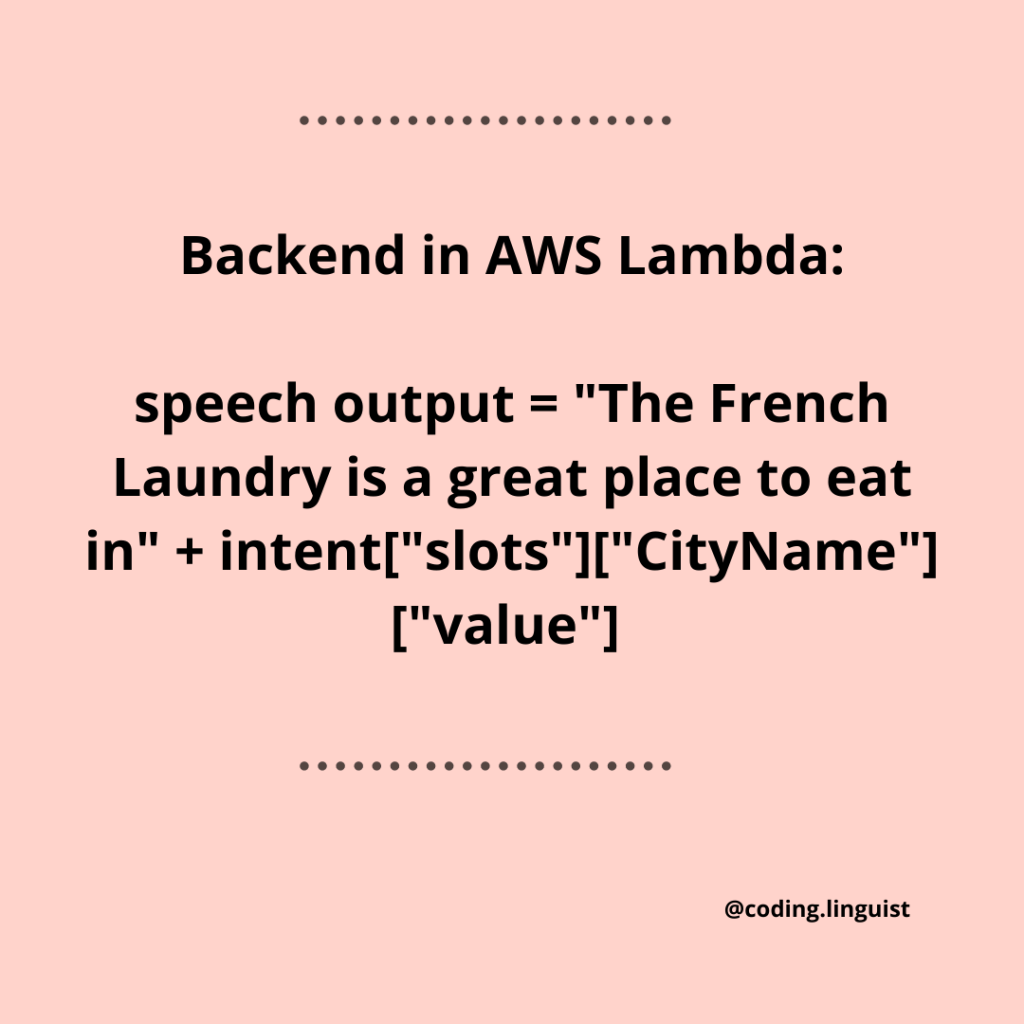
Each intent is “handled” at the backend, using AWS lambda for instance, and provides appropriate responses for each intent.

𝐒𝐥𝐨𝐭𝐬

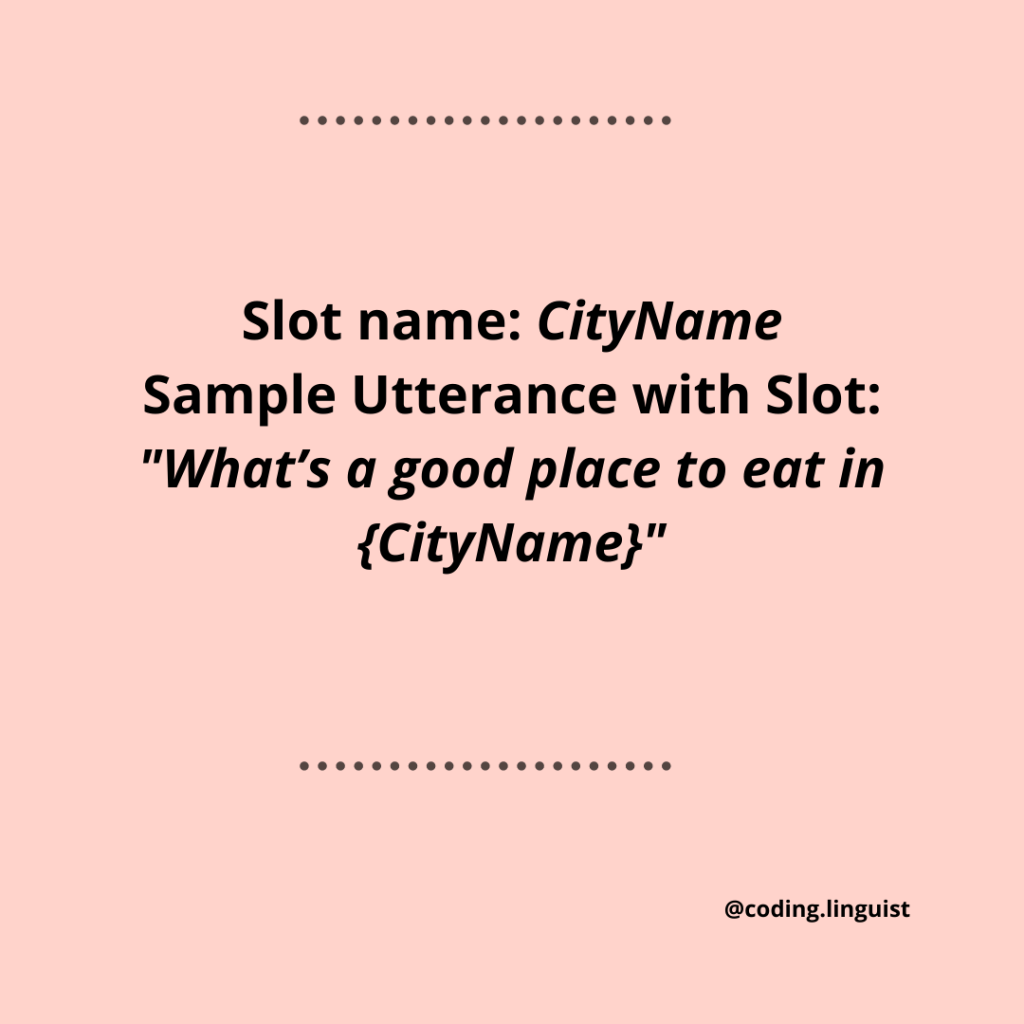
Words that express variable information such as names and locations can be allocated as slots.
Such words can be highlighted in the original utterance using curly braces {}
You can then create a new slot name such as StreetName
You then assign your slot name to a slot type such as dates or place names.
These types can be built-in or custom made.

Hope these snippets are helpful 🙂

What is SSML?

You’ve probably heard of HTML but possibly not SSML. Where HTML is used to describe the structure of a web page, SSML (Speech Synthesis Markup Language) is an XML based markup language used in speech synthesis applications. It controls aspects of synthesized speech such as pronunciation, emphasis, pitch and rate. The Alexa Skills Kit supports a subset of SSML tags to make your Alexa skill more personable and customizable. Cool features include things like adding emotions such as “excited” or the addition of audio files to your app. Note – If you’re using the Alexa Skills Kit SDK for Node.js or Java you don’t need to use the <speak> tags!


Have you used SSML before?

For more info on using SSML with your Alexa App check out this documentation: https://developer.amazon.com/en-US/docs/alexa/custom-skills/speech-synthesis-markup-language-ssml-reference.html

MongoDB: A note on documented-oriented databases.

I’ve recently started working with MongoDB for database management and thought I’d write a short note on my current learnings. In the past, I’ve used SQLite and PostgreSQL. The distinguishing feature between MongoDB and the former approaches is whether we are dealing with a relational model of data management or a document-oriented model. MongoDB is what is known as a NoSQL (‘not only SQL’) approach.

In contrast to a relational system like PostgreSQL which makes use of traditional tables that store structured information, MongoDB uses a document-oriented data storage model. It’s a non-relational model that stores unstructured data in JSON-like documents. This may be particularly helpful for unstructured data such as emails or text files. However, MongoDB can also deal with structured data like data and zip-codes – just in a different way to a table-based model. Documented-oriented approaches can allow for greater flexibility and easier scaling.

For Node users like myself – there is an npm module for MongoDB that makes reading and writing from the database with Node very straightforward.

As someone who is still learning, I’d love to hear your thoughts on the benefits and downfalls of a relational versus non-relational approach.

Learn more here: https://www.mongodb.com/nosql-explained

https://www.mongodb.com/document-databases

https://www.postgresql.org/docs/6.3/c0101.htm

ES6 and Arrow Functions – Node.js Basics Part 3

So, the ES6 feature of arrow functions is not unique to Node.js, but they will be helpful to know as a more concise alternative to a regular function if you’re not already family with them. Both standard and shorthand arrow functions exist.

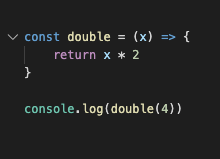
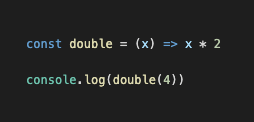
An ES5 function is compared with a standard ES6 arrow function below:

Both will produce a result of 8 with console.log(double(4))

Another feature of the arrow function is its shorthand syntax. Simple functions that take in an argument and immediately produce a result like the one above can use this shorthand form in order to be cleaner and more concise.

In this case, the curly braces and the return keyword are not necessary.

This shorthand syntax is used for simple rather than complex functions. For example, an if-statement would require the longer form of the arrow function.

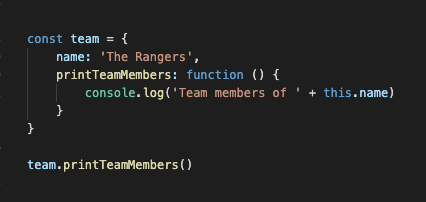
Arrow functions are not a good choice when its comes to methods. That is, when they are used as properties on an object when we want to access “this”. For example “this.name” in the below examples. Arrow functions do not bind their own “this” value.

ES5 format:

team.printTeamMembers()

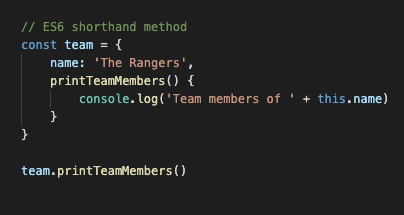
We can, however, use an ES6 shorthand method syntax in this case: 

Hope that’s helpful! Happy coding 🙂

What is npm?

npm (Node Package Manager) is on online repository used by Node.js developers. It contains multitudes of libraries of pre-packaged code that are used by millions of people across various applications.  Much of it is free and open-source.

Usually you will use an npm package for something that is not unique to your app, meaning – there’s no need to reinvent the wheel. These could include things like email validation, a UI library like React or a debugging tool. 

You can install both local and global dependencies:

Local packages are installed directly on your app in the node modules directory and are listed in the package.json file. They can be installed on your project with a simple npm install command. In order to make use of a local package in a particular code file, you will need to include require(‘package-name’).

When you install a package globally you don’t install it directly into your source files, but rather in a single place on your system so that it can be re-used across various applications. This can be done with an npm install -g command. Globally installed packages give access to a new command in the terminal and should really only be used for packages that you intend to utilize across a number of projects. For instance, the nodemon package will allow you to automatically restart your app whenever the code is updated. This is potentially helpful across a whole range of apps.

Do you have any favorite npm packages?

What is Node.js?

Since I’m refreshing (I’ve done a little before) and learning new material in Node, I thought I’d make a few posts covering the basics. For anyone interested, I’m finding Andrew Mead’s Complete Node.js Developer on Udemy very helpful so far!

First up, what is Node.js?

Node.js a JavaScript runtime environment which allows your JavaScript code to run outside of the web browser (the client side of things) and on the server and command line side of things. It runs on Chrome’s V8 JavaScript engine.

It is non-blocking which means that initiating one data request will not block another from starting, i.e., it’s faster!

It makes use of a call-stack. Every time a new method in your program is called, the “call-stack” will get that new value added on top of it. Each part of the call-stack is like an element in the history of our program. When each function has been completed, it is no longer needed and it is “popped-off” the stack or the program history.

Node has an event queue. As we know, methods are added to the call stack as we go through our program. If one of those methods has to be called at a specific time, for example, that method can be pushed onto the event queue while allowing the remaining code to continue running. Once JS has gone through the program it will check the event queue to see if there’s anything left over to run.

Hope that’s helpful! Do you have any good Node.js tips?

Here a couple of other useful resources 🙂

https://www.freecodecamp.org/news/what-exactly-is-node-js-ae36e97449f5/

https://nodejs.dev/the-nodejs-event-loop

Free/Low-Cost Coding Resources – Programming for Beginners

Learning how to code from scratch can be pretty overwhelming and potentially expensive depending on where you choose to study. I’ve put together a list of some great free/low-cost coding resources to get you started. Hope they’re helpful, and would love to hear about any more you can recommend!

Coursera  – there’s a subscription fee for this one but you can gain access to experienced professionals and university professors. I took a number of Charles Severance’s courses in Programming for Everybody in Python and fell in love with coding. Definitely beginner friendly and an awesome teacher.

Udemy – Again, there’s a fee, but courses vary in cost and there are often large discounts available. So, so many types of programming courses available whether it be mobile development, data science or machine learning. I took Jose Portilla’s course on Natural Language Processing in Python and loved it.

Khan Academy – This was helpful to me as a super beginner in HTML/CSS and was a great way to learn the basics. And it’s free!

LeetCode/Codewars – when you get beyond the basics and want to try your hand at some algorithms, LeetCode and Codewars are both great places to start. While there are fees for premium subscriptions, a lot of the resources are freely available.

YouTube – so many tutorials on so many topics by experienced developers. Not to be overlooked and totally free of course 😉

StackOverflow – probably every programmers best friend. Not a course but an amazing troubleshooting resource where you can ask your coding questions and learn from others.

Happy coding 🙂

The Great Escape: Adding Code Snippets To Your HTML File

When building up your portfolio, or any HTML file that you’ll want to use in a web browser, the formatting of code and code snippets can be a little tricky.

Some elements of, say, your JavaScript or Python syntax may cause your web browser some confusion. The overlap between symbols such as “>”or “&” can cause difficulty in interpretation.

This can be avoided by manually changing overlapping symbols through “HTML escaping” which will correctly render your code snippets in the browser.

A quick and easy way to avoid the tedium of making these changes by hand is to use an online HTML Escape Tool like https://www.freeformatter.com/html-escape.html or https://codebeautify.org/html-escape-unescape.

Check it out, and make the great escape 😉

APIs, the Universe, and Everything


What is an API? 
 API stands for Application Programming Interface – that sounds a little scary, but in reality, it’s really just a kind of middle-man that can be used to pick up information from one location (the provider) and deliver back to another (the consumer).

FedEx for Machines
 Let’s say you have words, information, well-wishes, bills – if you’re a company, which need to get into the hands of another person.You could leave your house or office, hop in the car and drive across the country to hand-deliver the letter, birthday card or electricity bill to that person (the latter would probably be as desirable a job as tax-collector), or you could have Fedex do it for you.
 Fedex is somewhat like an API in that it receives information/data from you and provides it to someone else on your behalf. All the sender and receiver need to do are conform to Fedex’s terms of service – such as using a particular label, signing off on a package etc. All kinds of applications use a similar service when they want to provide or receive information to and from various other apps. This service is called an API. As long as each application (the consumer and the provider) conform to the constraints of the API, then data can be effectively communicated between them. 
 The Google Maps API is a great example of this that you’re probably familiar with. Let’s say you’re perusing a restaurant review app and see that they’re using a Google Maps widget to show you the location. Rather than that application having to build its own mapping system with a multitude of locations, co-ordinates and directions, the Google Maps API can be used (like your Fedex service) to access that information and have it delivered back to the restaurant app.

The Internet of Things
 Two other concepts to be aware of in this realm are the API Economy which is the overall system that is composed of the proliferation of API services that are available and the Internet of Things (IoT). The Internet of Things refers to the extension of communication between users and applications to devices like smartwatches, smartcars, and voice assistants when they take to the internet and can also be accessed through APIs. Billions of the devices are expected to appear just in the coming year.

The Universe and Everything
 While doing some research on APIs, I sat back awestruck at the exponential development of this data-based universe. I could see it expanding rapidly as each new device, each new app linked and crossed paths and grew. A visualization of multitudes of ever-growing and overlapping paths and interfaces was before me.
 But then I thought, is it really that surprising? I mean, the more we learn about the natural world we live in, the more we find there is to learn. A simple leaf becomes its apex, veins, and petioles, its epidermis, cuticle, and cells, and it works to leverage an intricate chemical process to survive. Upward and outward, we explore nebulae, galaxies and black holes. We can feel overwhelmed by the rate at which these tech creations multiply, connect and grow. But maybe we could also take our ability to create such worlds as a signpost, a reflection. What if, instead of letting change, creation or growth only scare us, we let it still us.
 Rather than draw a stark line between ever expanding technological developments and our humanity, perhaps our increasingly complex created universes could remind us that we are in fact made in the Imago Dei. And that, by comparison, our creative advancements are mere echoes of the brimming complexity of the world around us. That way, we can be both humbled and encouraged, cautioned and in awe. We can build, create, and learn – knowing that our greatest achievements come with limitations and with an arrow pointing to something more.
Here are a couple of resources on APIs and the Internet of Things if you’d like to learn more:
What exactly is an API? 
What’s an API and Why Do You Need One?
The Emerging Internet of Things